
Trust Centre

How ExtraProof handles evidence and data.

University IT, data protection and procurement find the basis for their review here. Statements are limited to what is evidenced; open points are marked as open.

Four questions, four answers.

01

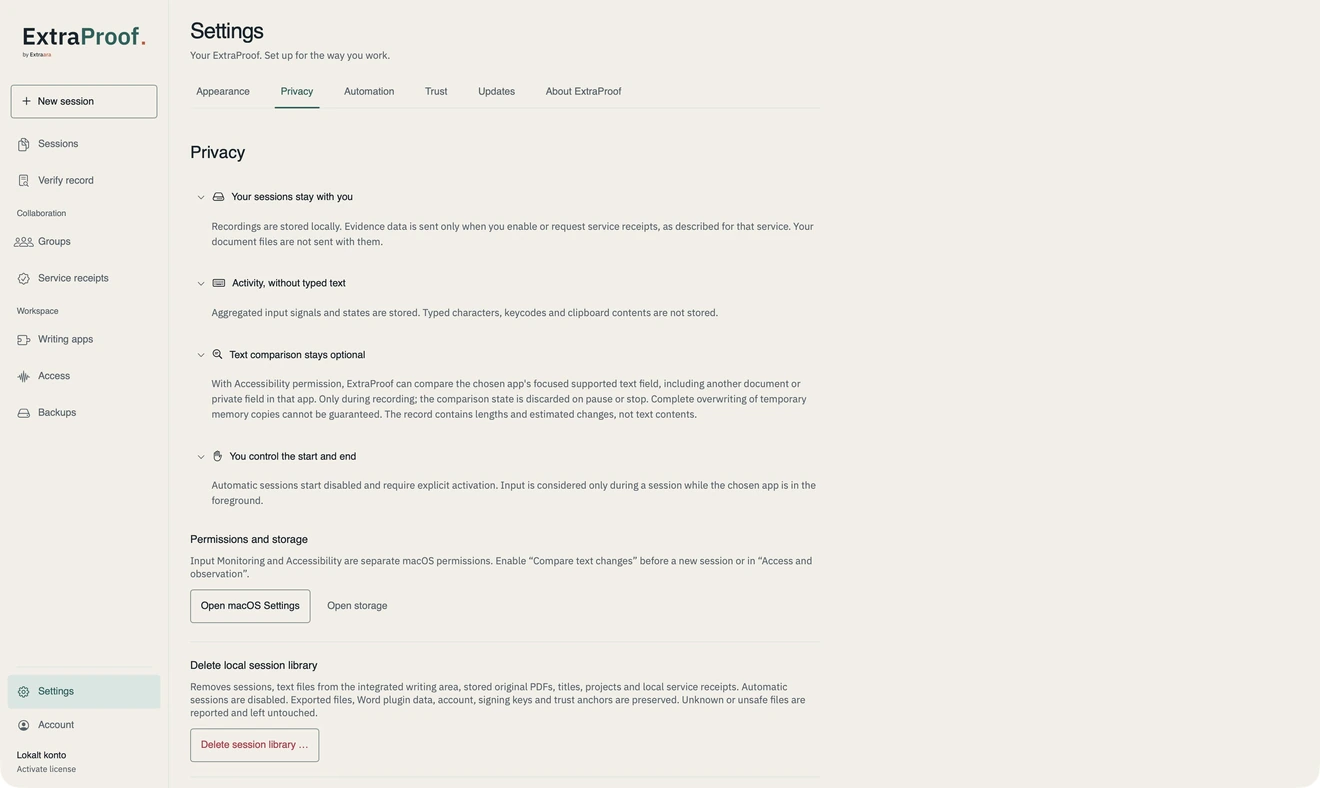
What stays on the device?

Writing sessions and the local journal. The journal holds process data, but no manuscript text, no typed characters and no clipboard contents. Input verification uses key and timing information only transiently in limited memory. The record stays on the device until you share it.

02

What leaves the device?

Only what you share: the record and the file, by email or portal. With Moodle this happens only after you confirm recipient, course and activity. In Word, a full DOCX copy is passed to the local ExtraProof service on the same device.

03

What does Extraara receive?

From Verify, nothing: files are processed in the browser’s memory. Through the contact form, we receive the information you enter and submit there. Only if you activate or request the optional service receipts in the app are the details shown there transmitted. For a pilot, recipients, responsibilities, access, storage and deletion are documented in writing beforehand.

04

What can an institution verify?

Whether record and signature are unchanged, whether the file matches the bound version, which observation gaps exist and which level was actually achieved, also offline. Not verifiable: a person’s identity, the truth of all events and the origin of thoughts.

ExtraProof privacy settings: local session data, activity without stored keystrokes, optional text comparison and deliberate control over recording start and stop.
Privacy · ExtraProof 1.9.0
Data flow at a glance
  1. 01

    Writing application

    Word, a writing app or another supported tool. The manuscript stays there.

    On the device
  2. 02

    ExtraProof on the device

    Captures permitted process data and processes it locally. No manuscript text in the journal.

    Local processing
  3. 03

    Creation Record

    Signed, bound to the file version and stored locally.

    Signed record
  4. 04

    Your decision

    You share record and file, or confirm a Moodle submission.

    Institution
  5. 05

    Verify

    Recipients verify in their own browser. No transfer to Extraara.

    Local verification

Steps 1 to 3 take place on your device. From step 4, only what you initiate happens.

Exceptions are named, not left out: Word passes a DOCX copy to the local service, and with Moodle the document and record go to the confirmed institution. Metadata can be personal data even when processing is local.

Documentation for your data protection review

Before every pilot we define and document the following in writing for the specific environment:

  • Data flow and roles of the parties involved
  • Hosting provider and processing locations
  • Subprocessors
  • Retention periods and deletion
  • Data processing agreement (DPA)
  • Information for your data protection impact assessment (DPIA)

Fixed values for hosting, retention and subprocessors are not yet published. We state no values that are not confirmed. We make no blanket GDPR compliance claim; it is assessed with your data protection office for the specific environment.

Open provenance ecosystem

Extraara is a member of the Content Authenticity Initiative.

ExtraProof is being developed for interoperability with C2PA Content Credentials and open provenance infrastructure.

About the CAI
Content Authenticity InitiativeExtraara

All trust documents

Extraara is a member of the Content Authenticity Initiative.

C2PA interoperability in development

Standards and trust
Content Authenticity InitiativeExtraara